
Another antivirus. A new firewall. One more email filter. Each purchase felt like the right call at the time. So why does your security never feel quite finished?
For many Dutch SMBs, this isn’t a hypothetical. Research from Dutch IT Channel shows that 46% of SMBs run between 11 and 40 different security solutions. Another 6% manage more than 60 tools. Yet 67% of those same businesses say that complexity is a barrier to effective defence.
Buying more tools is not the same as being better protected. In this article, we explain why a full toolbox can create a false sense of security — and what actually works for businesses that take protection seriously.
By the numbers
46% of Dutch SMBs use between 11 and 40 different security tools.
67% of them say that complexity is an obstacle to effective defence.
Source: Dutch IT Channel / SMB Cybersecurity Report 2025
1. Why SMBs Keep Buying Security Tools
The instinct to add more tools is understandable. Every threat that makes the news — ransomware, phishing, CEO fraud — triggers a purchase designed to address that specific risk. Over time, there’s a tool for every fear, but no coherent picture.
This is called tool sprawl: a security environment that has grown organically in response to incidents and vendor conversations, rather than from a deliberate strategy. Each individual purchase made sense at the time. The combined result is a patchwork.
What drives these purchasing decisions?
- A security incident at a competitor or in the news
- Pressure from vendors or resellers promoting the latest product
- NIS2 compliance uncertainty: businesses buy tools to “tick the box”
- Lack of internal expertise to fully configure and use existing tools
The outcome: tools that partially overlap, are rarely configured correctly, and are barely monitored. That is precisely where attackers find their way in.
2. Too Many Tools Create Complexity — and Blind Spots
There is a direct relationship between the number of tools in a security stack and the likelihood of configuration errors. Every tool has its own dashboard, its own alerts, its own update cycle, and its own administrator — or assumes there is one.
In practice, nobody has a complete picture of how all the tools work together. Small gaps — an outdated policy, an endpoint missed during a software update, a feature temporarily disabled — go unnoticed as a result.
Blind spot
Around 20% of Dutch businesses cannot confirm whether they have been attacked.
Reason: “a lack of monitoring and visibility” into their own security environment.
Source: Grant Thornton Cyber Readiness Report Q3 2025
Alert Fatigue: When Too Many Notifications Become Dangerous
Every tool generates alerts. When ten tools each produce dozens of notifications per day, nobody has the capacity to determine what is actually urgent. Staff start skimming or dismissing alerts — not because they are careless, but because the volume is overwhelming.
This is alert fatigue, and it is more dangerous than it sounds. A suspicious login attempt, an unusual file transfer, a failed MFA request — each of these can be the start of an attack. If they are lost in the noise, an attacker has time to move through your environment undetected.
3. Overlapping Tools Are Duplicate Costs — Without Extra Security
Many SMBs pay for the same function more than once without realising it. An endpoint protection suite often already includes email scanning and a firewall component. But a separate email filter, a standalone firewall, and an additional backup solution were also purchased — each from a different vendor.
That overlap costs money, but the real problem is functional. Two tools monitoring the same thing can contradict each other. During an incident, staff have to stop and figure out which tool to trust before they can act — while the clock is ticking.
A practical example of tool overlap
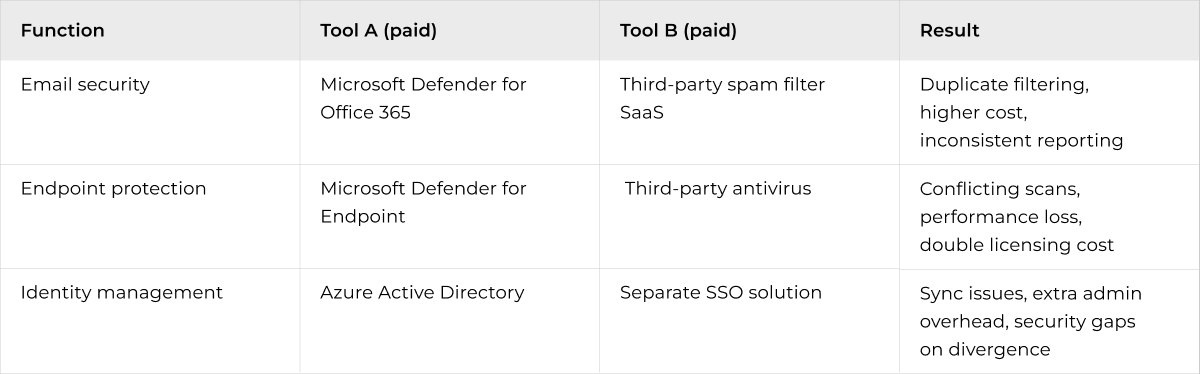
Microsoft 365 Business Premium already provides a solid security layer for most SMBs — including email protection, endpoint management, and identity control. Yet we regularly see businesses layer multiple standalone tools on top that duplicate the same functions.
Monthly tech tips for SMBs
Quick, useful tech tips to help your business run better. We don’t send often — but when we do, it’s worth opening.
4. Misconfigured Tools Offer False Security
A tool that is running is not necessarily a tool that is protecting. The most underestimated cause of security breaches in Dutch SMBs is not the absence of software — it is the presence of software that is incorrectly configured.
Grant Thornton’s research shows that 74% of Dutch SMBs have taken some security measures but score inadequately on critical components. That is not the same as doing nothing — in fact, it is arguably more dangerous, because it creates the impression that everything is in order.
How configuration errors happen
- A firewall rule is temporarily relaxed during a project and never restored
- MFA is switched on but does not apply to all accounts or applications
- A backup tool is running — but a restore test has never been performed
- Endpoint protection is installed on 20 of 35 laptops after the team grew
- Automatic updates are turned off to avoid disrupting staff during office hours
None of these errors appear on an invoice or in a dashboard that is not checked daily. The tool is paid for, the tool is running — but the protection is not working as intended.
5. The Human Element: Tools Don't Protect Against People
Technology protects systems. People protect organisations. That distinction matters, because most successful attacks on Dutch businesses do not start with a technical vulnerability — they start with an employee who clicks a link, shares a password, or approves a fraudulent invoice.
Phishing remains the dominant attack vector in 2026. Research from Dutch IT Channel (June 2026) shows that phishing is responsible for the largest share of successful attacks on Dutch SMBs — despite the fact that many of those businesses already have email security in place.
Insight
An employee trained to spot phishing is more effective than ten email filters running side by side.
“Awareness training is one of the highest-ROI investments in cybersecurity for SMBs.”
— NCSC, Cybersecurity Assessment Netherlands 2025
What training does that tools cannot
- Employees learn to recognise unusual behaviour, even when it passes tool filters
- Phishing simulations build awareness without causing real damage
- A culture of reporting significantly reduces the impact of a successful attack
- Human oversight of unusual transactions, access requests, or login patterns
- CloudConnected integrates user awareness training and phishing simulations as a standard part of every security engagement — not as an add-on, but as a foundation.
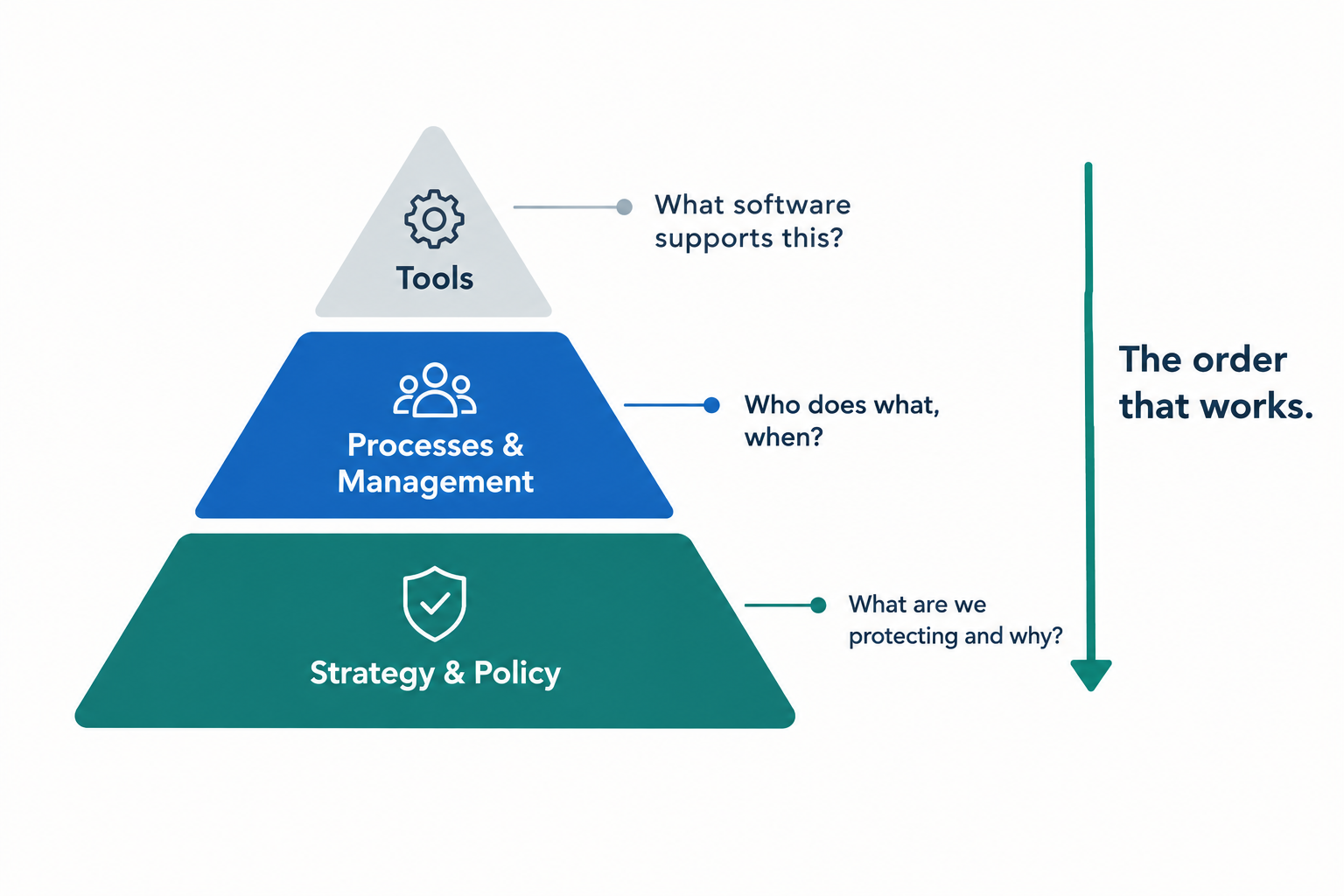
6. What Actually Works: Strategy First
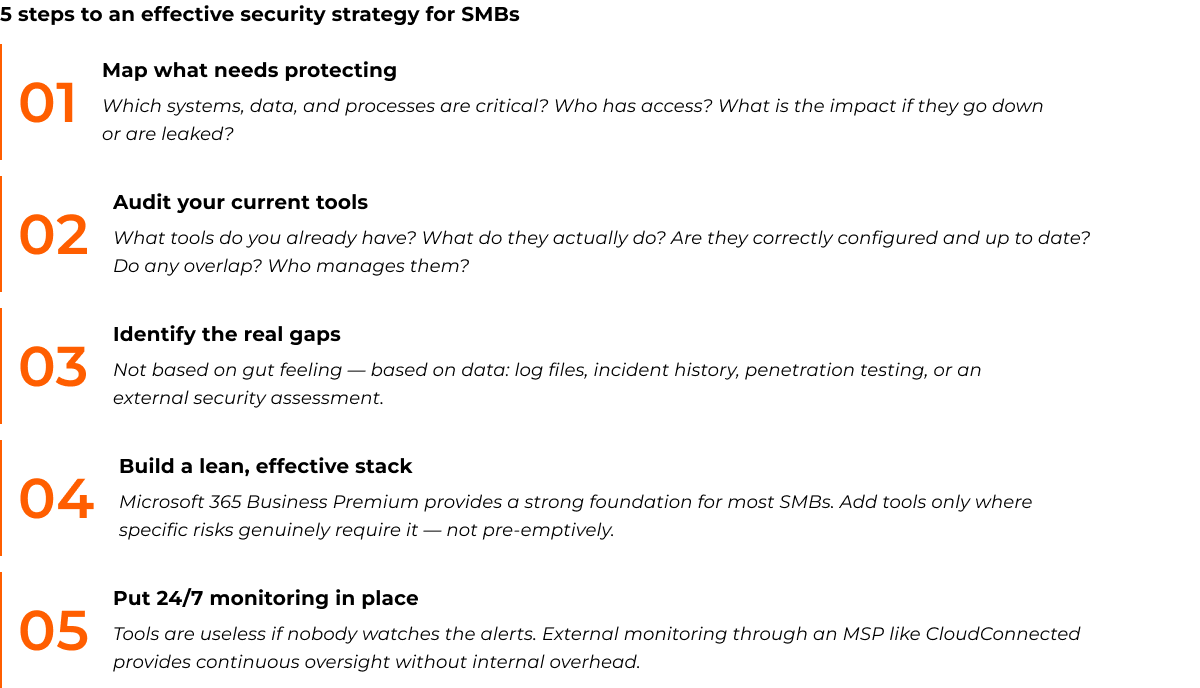
The question is not how many tools you need. The question is: what do you need to protect, who has access to it, and what do you do when something goes wrong?
A security strategy starts with insight — not software. Once you know what your organisation’s crown jewels are (customer data, financial systems, production processes), you can determine which tools address those specific risks.
Real-World Example: From Tool Chaos to Clear Security
Case Study — Dutch wholesale distributor, 45 employees, Rotterdam area
- Over six years, a wholesale distributor near Rotterdam had purchased nine different security tools — each triggered by an incident or a vendor recommendation. The tools were managed by a part-time IT employee who was also responsible for the helpdesk.
- The problem: An internal audit revealed that three tools had not been actively configured for over a year. Two tools were monitoring overlapping systems and together generating an average of 340 alerts per day. Nobody was reading them consistently.
- The approach: CloudConnected carried out a stack evaluation. Five tools were consolidated into Microsoft 365 Business Premium, including Defender for Endpoint and Defender for Office 365. Two tools remained for specific functions Microsoft did not cover. The backup solution was replaced with Acronis, with daily restore tests built into the process.
- The result: Daily alerts dropped from 340 to 18 — all relevant, all resolved within four hours. Monthly security costs fell by 31%. The IT employee now had time for proactive maintenance instead of constantly putting out fires.
“We thought we were well protected because we had so many tools. Now we know we are actually better protected because we understand what every tool does.” — IT lead, Rotterdam
Key Takeaways: What You Can Do Today
Most businesses that have an incident response plan discover gaps the first time they test it. The ones that discover gaps during a real incident pay significantly more to close them.
Action points
✅ Audit your current tools — do you know what each one actually does?
✅ Check configurations — are all tools active and correctly set up?
✅ Remove or consolidate overlapping functions
✅ Set a monitoring baseline: who reads the alerts?
✅ Train your employees — technology without human awareness is only half the job
✅ Consider 24/7 external monitoring if you lack internal capacity
The most resilient businesses in the Netherlands are not the ones with the most tools. They are the ones who know what is happening inside their environment, can respond quickly, and have employees who understand the first line of defence.
Ready to Simplify Your Security Stack?
More than 350 Dutch organisations work with CloudConnected for their IT security — not because they have the most tools, but because they have the right approach.
We assess your current security environment, identify gaps and unnecessary complexity, and build a clear, manageable plan that fits the size and risk profile of your organisation.